1. Create Pins that Direct to Valuable Resources
At the beginning of 2022, Pinterest made an algorithm change that affected how pins are shown to users on their home feed. Based on what I’ve observed, it seems Pinterest now focuses more on showing pins that lead to blog posts and valuable resources.
Beautiful images that do not lead to a helpful resource are being shown less. This generally includes sites like Flickr or uploaded images that don’t direct to any site.
2. Aim to Grow Your Followers and Reach
Having a large number of followers is important, but surprisingly it’s not as important as you might think. I’ve worked on boards that have fewer than ten thousand followers and see the website generate as much traffic and repins as a board that has a hundred thousand followers.
The trick is not to just think about growing your followers, but create pins that will reach non-followers on Pinterest.
To do this you need to post relevant pins that will attract your core audience. When you start to provide more relevant pins, Pinterest will start to display your pins in “Picked for You” on a user’s home feed more often, allowing you to potentially reach millions.
3. Do Pinterest keyword research
If you’ve already learned the basics of Google SEO, chances are you’re familiar with the term “keyword research.”
But in case you haven’t, keyword research is the process of looking for popular search terms people type into search engines and include them strategically in your content so that it appears higher on search results.
Luckily, Pinterest keyword research is a bit simpler than keyword research for Google. Let’s take a look at three techniques you can use to find keywords in your niche:
a) Pinterest search bar
Once you start typing any search term relevant to your blog niche, Pinterest will automatically suggest other commonly searched keywords.
These recommendations are based on what thousands of people on Pinterest have searched for.
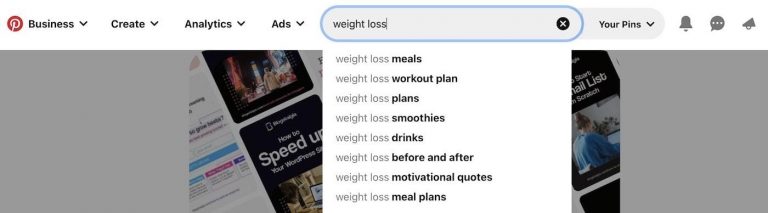
On the image above, you can see that when I type the search term “weight loss,” the following suggestions appear:
- “weight loss” meals
- “weight loss” workout plan
- “weight loss” plans
- “weight loss” smoothies
- “weight loss” before and after
4. Use Group Boards
A group board is just like a regular board but it allows the board creator to invite other collaborators to Pin onto that board and they are a fantastic way to get more traffic from Pinterest.
The power of group boards has wavered over the last few years. In 2018, Pinterest announced that they were going to reduce the importance of group boards. This made some Pinners believe there’s no point in spending any time on group boards.
But fear, not group boards can still help you reach new Pinners. You just have to find the right boards. So you might have to do some digging to find the right group boards. Use Pinterest’s search tool, set it to search for “boards” and type in a long-tail keyword to get your search started. You’ll know you’ve found a group board because they’ll be a circle icon with profile photos of group collaborators in the lower-left corner of the board cover.
5. Add the “Pin It” Widget to Your Site
This step is low-hanging fruit but don’t skip it! Pinterest has a handy widget builder that allows you to build widgets to add to your website so website visitors can see your boards, follow your account or Pin images directly from your blog onto their Pinterest page. If you write a super valuable blog post that people will want to refer back to or keep handy, then you want to make it really easy for them to do so! And since you’re probably putting 100% into every last one of your blog posts so they are going to be worth saving for future reference. Remember the more people Pinning your Pins increases the chances you’ll get more traffic from Pinterest
Follow the directions here to build a widget for your site. And don’t forget to encourage people to Pin your post, as blogger Kelly Ward does! A simple CTA can really increase your Pins!
6. Be Patient
Finally, the last thing you need to always keep in mind about how to use Pinterest to drive traffic to your blog is to BE PATIENT! Things rarely happen overnight so you might not see instant traffic. But you need to keep saving and creating Pins and using Pinterest analytics to measure what’s working and what’s not.
Pinterest’s built-in analytics will show you everything you need to know to master your Pinterest strategy, including which of your Pins are driving the most traffic, engagement, and saves, what days you see the most impressions, saves or engagements and much, more.
Thank you for your Valuable Time 💫
 Azmair
Leave a comment